
ELD Services

Driver Vehicle Inspection Report Service (USA)

No rates.

Driver Vehicle Inspection Report Service is a DVIR tool that allows drivers and fleet managers to create, view, manage, and document vehicle inspection reports for trucks and trailers.

It supports inspection report creation, vehicle and trailer selection, defect classification, signatures, PDF generation, and repair status tracking.

Drivers can inspect trucks and trailers, select detected defects, attach photos, confirm that no major defects were found when applicable, sign the report, and complete the DVIR. Fleet managers can review created reports in the web system, filter them, open report details, print PDF versions, and update defect repair status.

Driver Vehicle Inspection Report Service (USA)

Key Features

Driver Vehicle Inspection Report Dashboard

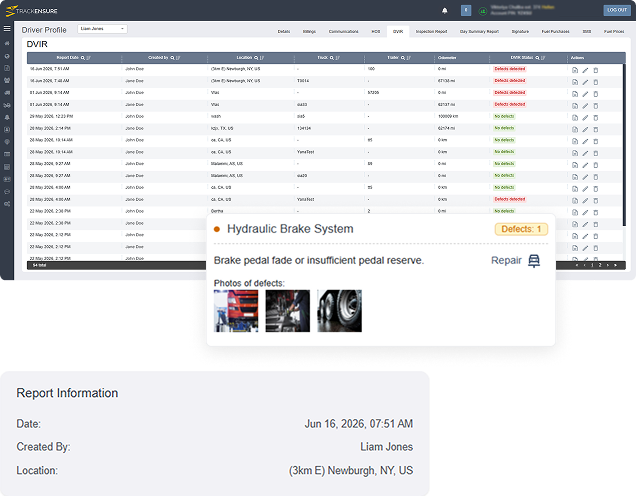
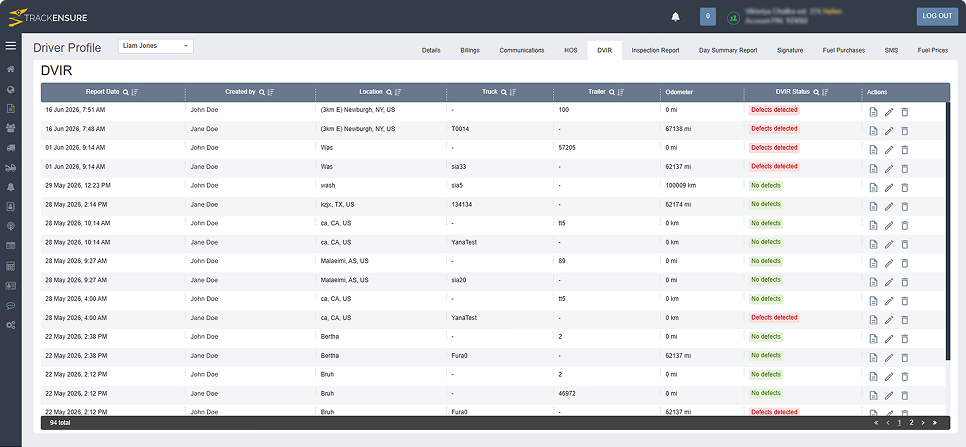
The Driver Vehicle Inspection Report Dashboard screen displays DVIR reports for selected trucks and trailers.

On this screen, users can review existing inspection reports, see report dates, vehicle information, locations, odometer values, report status, and available actions. Fleet managers can use the dashboard to search, filter, sort, open, print, or delete inspection reports.

This screen helps companies keep inspection records organized and makes it easier to identify reports with detected defects, corrected defects, or vehicles that do not require repair.

Driver Vehicle Inspection Report Dashboard

What Driver Vehicle Inspection Report Enables Organizations To Do

  • Create DVIR reports for trucks and trailers.
  • Support USA-specific DVIR workflows.
  • Allow drivers to inspect selected vehicles before or during a shift.
  • Display recent inspection reports for trucks and trailers.
  • Record report date, location, unit number, VIN, license plate, odometer, height, and width.
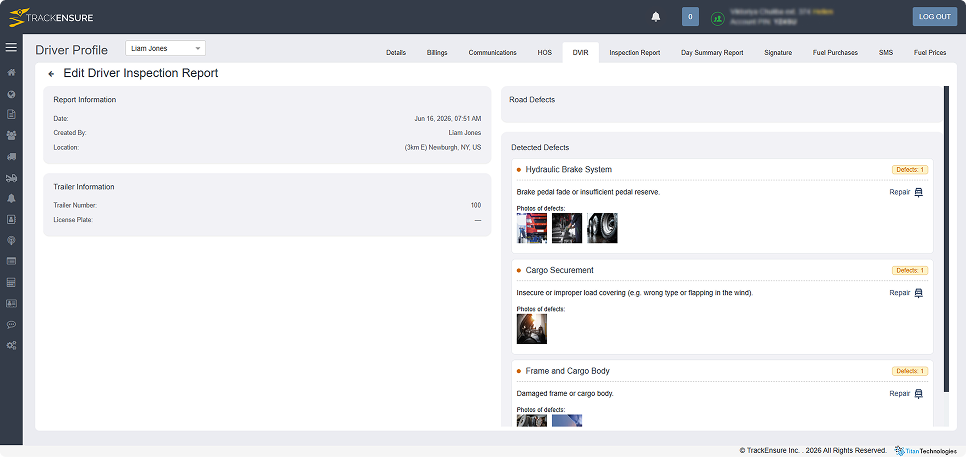
  • Select defects from standardized inspection systems.
  • Classify defects as minor or major.
  • Add custom defects when needed.
  • Attach photos to detected defects.
  • Confirm that no major defects were detected.
  • Collect driver confirmation and signature.
  • Support co-driver agreement or disagreement when applicable.
  • Generate a preview before saving the final DVIR.
  • Store completed inspection reports in the system.
  • View DVIR reports from the driver profile in the web system.
  • Filter reports by report date, creator, location, truck, trailer, and DVIR status.
  • Display DVIR statuses such as No Defects, Defects Detected, Defects Corrected, and No repair needed.
  • Open detailed inspection reports from the web interface.
  • Print DVIR reports as PDF.
  • Send DVIR reports when needed.
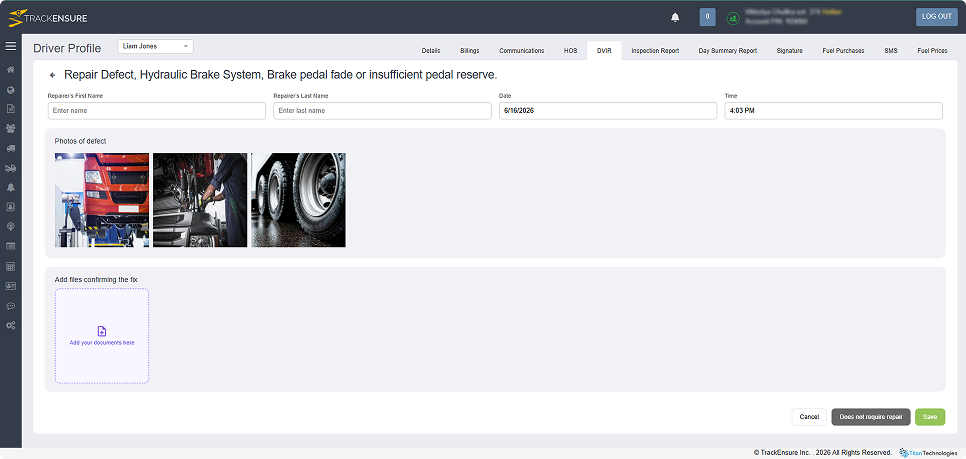
  • Mark defects as corrected after repair.
  • Mark defects as not requiring repair.
  • Attach files confirming the fix.
  • Maintain inspection and repair history for audit purposes.
  • Improve visibility into truck and trailer condition.
  • Help fleet managers identify vehicles that require maintenance attention.
  • Support compliance-related documentation for roadside inspections and internal reviews.
What Driver Vehicle Inspection Report Enables Organizations To Do

Bestseller Services

Refrigeration & Cold Storage Monitoring

TrackEnsure provides fully managed remote monitoring services for refrigerators, freezers, and cold storage facilities. Using the VL103D GPS tracking device combined with temperature and door sensors, we help businesses monitor ...

TrackEnsure Telegram Support Bot

TrackEnsure Telegram Support Bot

Connected Driver Support Inside the TrackEnsure Ecosystem

Packages and Pricing ELD

Basic TMS Core

ELD Compliance & Fleet Management

Launch Fast & Stay Compliant

Perfect for small fleets and new partners looking for a solid foundation and full HOS compliance.

$25
driver / month
  • Real-Time Fleet Monitoring
  • Assets Map & Telematics
  • IFTA: Mileage per State
  • DVIR
  • Comprehensive Reports
  • Standard Triggers (HOS)
  • Built-in Messaging
  • Drivers Management
  • Assets Management
  • User Management
  • Fault Codes Interpretation
  • Mobile App for Drivers
  • ELD Service
  • 24/7 Intake | Business Hours Support

Growth

Scale with Operational Efficiency

Designed for expanding fleets that need to automate maintenance, dispatching, and technical oversight.

$30
truck / month
  • Basic TMS Core
  • Garage & Parts Warehouse & TimeTracker (Web/Mobile)
  • Maintenance
  • Violation Monitor
  • Fuel Control

Enterprise

The Complete Digital Ecosystem

For large-scale carriers requiring deep integration of all business processes into a single network.

$45
truck / month
  • Growth Package
  • Client Vantage Point
  • Advanced Dispatching System (NetSuite / QB Integrated)
  • Logistics Dispatch Management
  • Warehouse Management (WMS)
  • HRM Orchard
PREMIUM SERVICES (billed separately):
  • Custom Development 
  • Priority SLA Support | Next Business Day Response
  • Electronic Data Interchange (EDI)

Pay-per-Use

Advanced add-ons for specialized needs

Custom Pricing
  • Advanced Triggers
  • Truck Location Feature
  • API Requests

*Please be advised that pay-per-use services and hardware are ordered and billed separately. 

Packages And Pricing

Basic Fleet Control

Visibility & Asset Control.

Efficient for local service fleets.

$15
unit / month
  • Built-in Messaging
  • Drivers Management
  • Assets Management
  • User Management
  • Garage & Parts Warehouse & TimeTracker (Web/Mobile)
  • Environmental Dispatch & Work Orders (Mobile)
  • DVIR
  • 24/7 Intake | Business Hours Support

Professional

Smart Fleet & Compliance.

Optimal for scaling and compliance.

$30
unit / month
  • Basic Package
  • ELD
  • Assets Map
  • Standard Triggers (HOS)
  • Comprehensive Reports
  • Maintenance
  • Violation Monitor
  • Fault Codes Interpretation
  • Fuel Control

Enterprise

The Industrial Ecosystem.

Strategic for complex logistics.

$45
unit / month
  • Professional Package
  • Client Vantage Point
  • Dispatching System
  • Warehouse Management (WMS)
  • HRM Orchard
Premium Services (billed separately):
  • Custom Development
  • Priority SLA Support | Next Business Day Response
  • Electronic Data Interchange (EDI)

Pay-per-Use

Advanced add-ons for specialized needs

Custom Pricing
  • Advanced Triggers
  • Truck Location Feature
  • API Requests

*Please be advised that pay-per-use services and hardware are ordered and billed separately. 

No rates. Hide Reviews

Leave a comment

Your email address will not be published. Required fields are marked *

Exclusive CTS 2026 offer

20% OFF HARDWARE
+ 2 MONTHS FREE

On any TrackEnsure service

PROMO CODE:

Offer valid through October 31, 2026. New customers only.

How It Works

  1. Close this window — we'll scroll you right to them.

  2. Pick any plan FREE

    Choosing a plan doesn't charge you and doesn't ask for payment details. You can change your plan or add others anytime later.

  3. Register your company

    A short form, about 3 minutes. (Enter the promo code in the Industry Sector field next to your selected industry.)

Exclusive CTS 2026 offer

5 MINI ASSET TAGS FREE
+2 months of Subscribition FREE

Save 100% — a $190 value

AI Camera MVT-9

$20 / month instead of $25 for the first 6 months
Save 20% on the subscription

GPS Tracker VL103D

Device $72 instead of $80 + $10 / month instead of $12 for the first 6 months
Save 10% on the device · 17% on the subscription

VL103D + Cargo Sensor K7800P

Kit $108 instead of $120 + $11 / month instead of $13 for the first 6 months
Save 10% on the kit · 15% on the subscription

* - Offer valid for new customers on the first order placed by October 31, 2026. One offer per company.

How It Works

  1. Close this window — we'll scroll you right to them.

  2. Pick any plan FREE

    Choosing a plan doesn't charge you and doesn't ask for payment details. You can change your plan or add others anytime later.

  3. Register your company

    A short form, about 3 minutes.

  4. Call or email to order

    You'll always find these on our website too.

FABTECH 2026 EXCLUSIVE OFFER

2 MONTHS FREE

On any TrackEnsure service

PROMO CODE:

Valid for 30 days from the date you received this booklet.
Available to new customers only.

How It Works

  1. Close this window — we'll scroll you right to them.

  2. Pick any plan FREE

    Choosing a plan doesn't charge you and doesn't ask for payment details. You can change your plan or add others anytime later.

  3. Register your company

    A short form, about 3 minutes. (Enter the promo code in the Industry Sector field next to your selected industry.)

×

    Request A Call Back


    * - Required